Owner
On the phone, anywhere
- Revenue today and by doctor
- How full each doctor’s day is, and no shows
- Who clocked in and when
- Discounts and refunds, named
Daftar · Clinic and dental
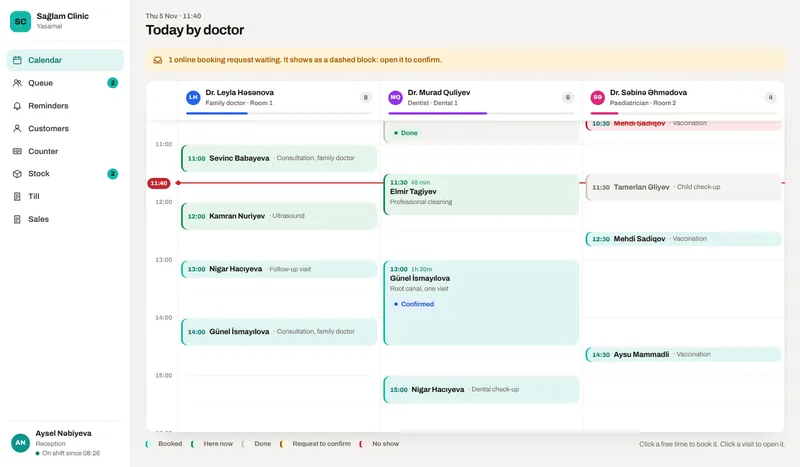
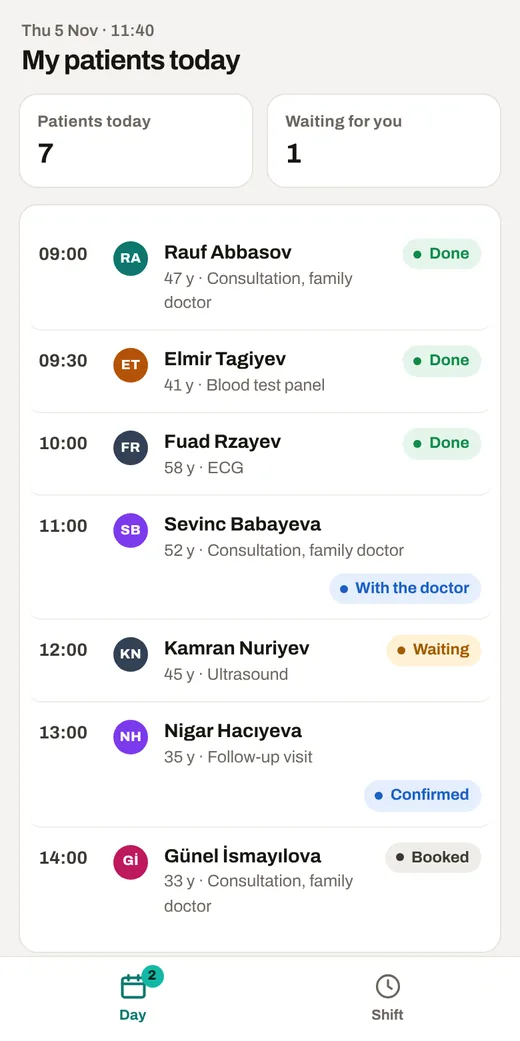
Reception runs the day from one calendar, doctors write the visit on their phone in a few seconds, and the owner sees revenue and empty hours by doctor.
01How it runs
Each step is a screen in the demo, used by the person who does that step.
By phone, message or the online link, into the right doctor’s free slot. AI reads a paper referral.
One message the day before. The patient replies 1 to confirm or 2 to move it.
Reception marks the patient in; the doctor sees who waits and for how long.
The doctor dictates, AI writes the note on the template, and the services done are ticked.
Reception bills what the doctor recorded, by card, cash or insurance, with the receipt.
The next visit is booked before they leave, or a recall goes out when it is due.
02Who sees what
Each opens the same demo from a different side.
On the phone, anywhere
On a computer or a tablet
On their own phone
03Follow one job
Open the demo and follow these steps. Switch the role and the device at the top of the demo.
Kamran Nuriyev is in the waiting room. Send him in to the doctor.
As the doctor, open Kamran, dictate the note with AI, and finish the visit.
Kamran is in Ready to pay. Take the payment.
Send tomorrow’s reminders and see the replies come back.
See revenue by doctor, waiting times and who came late.
What is in it
In Azerbaijan, medical institutions and private practice take payment through the e-kassa, so the checkout prints that receipt and keeps it next to the visit.
Price
30 to 499 AZN a month
One person with the counter starts at the low end. Several branches with every module and integration sit at the top. Tell me about the business and I will send you an exact price.
What moves the price
hello@arustamov.dev · +994 55 993 17 11
Other business types