Owner
On the phone, anywhere
- Orders and margin today
- What every shop owes, and who is late
- Stock that runs low
- Price changes and discounts, named
Daftar · Warehouse and wholesale
Reps take orders in the shop on a phone, pickers walk the warehouse bin by bin, and the owner sees sales, margin and who owes what without calling anyone.
01How it runs
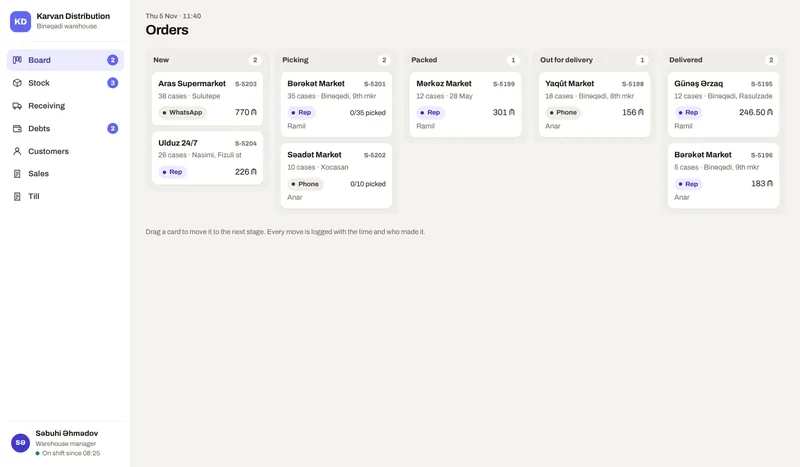
Each step is a screen in the demo, used by the person who does that step.
A rep takes it in the shop, or the office enters a call or a WhatsApp order.
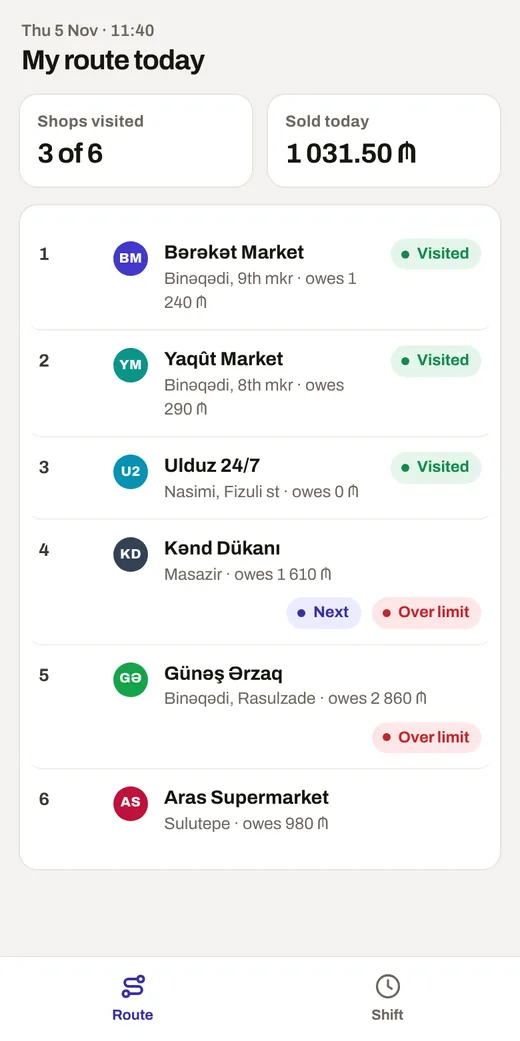
If the shop would go over its limit, the rep sees it before the order goes in.
The picker gets the list in bin order and scans each line.
A photo of the pallet; AI counts what is on it against the order.
Out with the driver; paid in cash at the door or added to the shop’s balance.
AI reads the supplier’s invoice; shortages are logged against the supplier.
Items below their minimum show up for the next purchase.
02Who sees what
Each opens the same demo from a different side.
On the phone, anywhere
On a computer or a tablet
On their own phone
03Follow one job
Open the demo and follow these steps. Switch the role and the device at the top of the demo.
As the sales rep, open Kənd Dükanı, add a few cases and send the order.
Open the new order and give it to Ramil to pick.
As Ramil, open the order, scan each line, photo check the pallet and pack it.
Send it out, then mark it delivered on credit.
See the shop’s new balance and who is over the limit.
What is in it
Selling to shops on credit is normal here, so debts are a first class part of the system: a limit per shop, the age of each balance, and a reminder before it gets old.
Price
30 to 499 AZN a month
One person with the counter starts at the low end. Several branches with every module and integration sit at the top. Tell me about the business and I will send you an exact price.
What moves the price
hello@arustamov.dev · +994 55 993 17 11
Other business types