Owner
On the phone, anywhere
- Takings and profit, live
- Every receipt and job, with the time
- Who clocked in and when
- Discounts and cancelled receipts, named
Daftar · Installers and repair crews
Technicians across the city, customers waiting at home, parts in the van and a bill to take on site. Daftar puts the counter, the work, the stock, the staff and the money in one place, with the owner’s view on the phone.
01How it runs
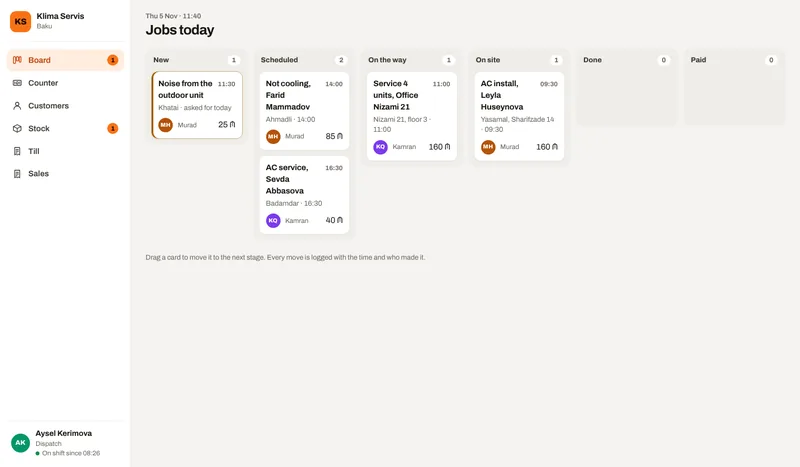
Each step is a screen in the demo, used by the person who does that step.
A call or a message, put on the board.
Given to a technician for a time slot.
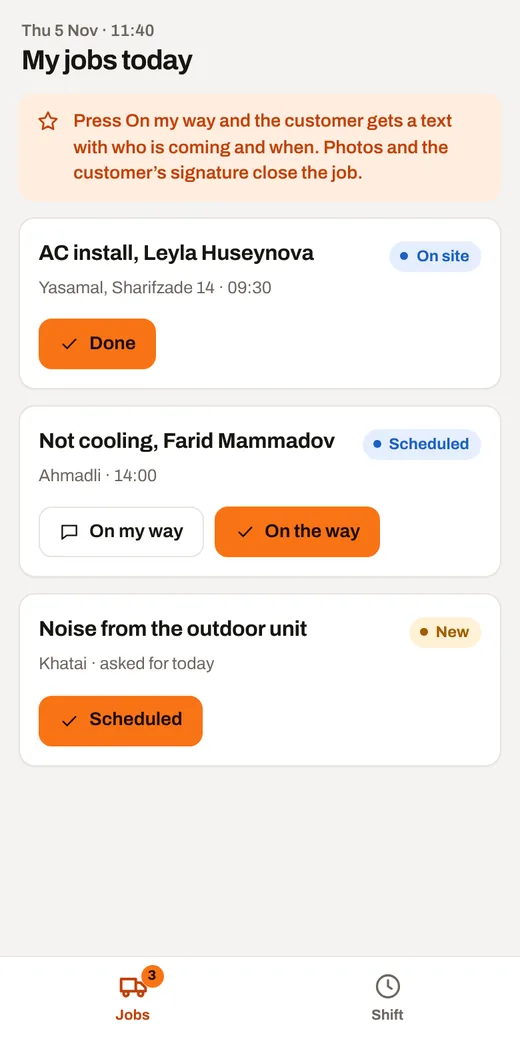
The technician presses one button; the customer gets a text with who and when.
Photos, parts from the van, the customer’s signature.
On site by card or cash, or on the company’s account.
02Who sees what
Each opens the same demo from a different side.
On the phone, anywhere
On a computer or a tablet
On their own phone
03Follow one job
Open the demo and follow these steps. Switch the role and the device at the top of the demo.
As dispatch, start where your day starts.
As technician, see your work on the phone and finish a step.
Sell something at the counter and see the receipt.
As the owner, see the takings, every action with its time, and who is in.
Ask your business a question.
What is in it
Price
30 to 499 AZN a month
One person with the counter starts at the low end. Several branches with every module and integration sit at the top. Tell me about the business and I will send you an exact price.
What moves the price
hello@arustamov.dev · +994 55 993 17 11
Other business types